Behind Meta's sky-high acquisition of Scale AI: How Web3 AI can get rid of bias
Both Web3 AI and Web2 AI have reached the crossroads of "volume computing power" and "volume data quality".
 JinseFinance

In recent weeks, a Clawdbot craze has swept through the X developer community. From GitHub commits posted at 2 a.m. to screenshots boasting "finally running!" late at night, this open-source project featuring a lobster emoji is becoming increasingly well-known.
(Source: Clawbot)
Some people have bought one or even multiple Mac Minis specifically for this purpose, keeping them running day and night in their homes. Others share how they use Telegram on Discord channels.
Remotely controlling a computer to deploy code has led to discussions among lawyers about its potential impact on the legal profession. Tech blogger Federico Viticci even documented his experience in detail on MacStories. He used Clawbot to consume 180 million Anthropic API Tokens in a week, concluding, "After using this superpower, I can never go back." (Source: X) What exactly is Clawdbot? Why is it generating so much excitement in the tech world? To be precise, Clawdbot is not a chatbot, but an AI Agent Gateway. Unlike tools like ChatGPT or Claude that require you to open a webpage, type a question, and wait for a reply, Clawdbot's design logic is: issue a command through a commonly used messaging application (currently supporting Telegram, WhatsApp, iMessage, or Discord, etc.), and it will invoke a large language model running in the background (such as Claude or Gemini) to translate your request into a local shell script and execute it on your computer.
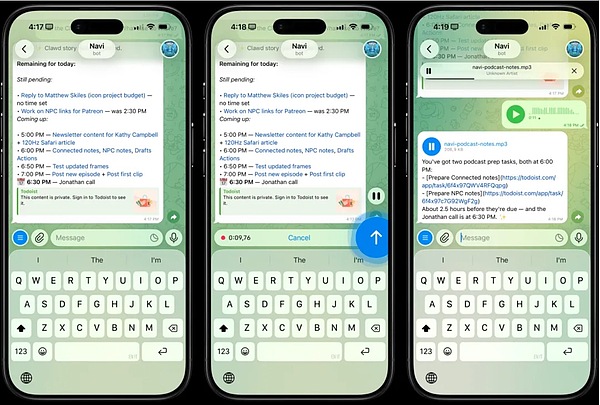
Image | Sending instructions to Clawdbot using imessage (Source: Federico Viticci)
In other words, it doesn't tell you what to do, but rather does a task for you directly.
In other words, it doesn't tell you what to do, but rather does a task for you directly.

Image | Peter Steinberger (Source: X)
In late 2025, Steinberger decided to open-source his personal AI assistant "Clawdis" and renamed the project Clawdbot.
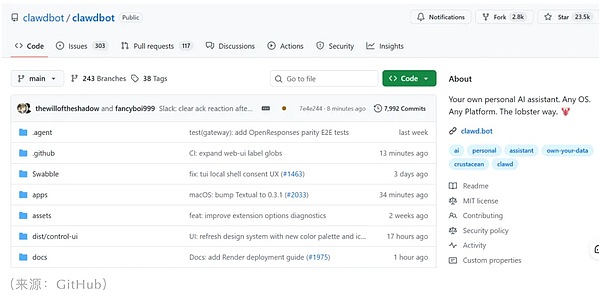
Within just a few weeks, the number of stars on GitHub surpassed 23k, and the Discord community grew from zero to over 5,000 members, with a nascent skills plugin ecosystem called ClawdHub taking shape. Community members contributed various plugins (skills) ranging from WhatsApp voice message transcription to automated website deployment.
(Source: GitHub)
Everything seems perfect, but Clawdbot still has one unavoidable problem: cost. Clawdbot itself is open-source and free, but it relies on the Large Language Model API to operate, and these API calls are billed in tokens. Federico Viticci, mentioned earlier, consumed 180 million tokens in a week. According to Anthropic's pricing, input tokens cost approximately $3 per million, and output tokens cost approximately $15 per million, meaning his bill could reach hundreds or even thousands of dollars. On Reddit, some users complained that "token usage is insane; it can use up the five-hour limit of a $200 Claude Pro plan in just one hour." The official documentation recommends a budget of $10-30 per month for light users, $30-70 for moderate users, and $70-150 or more for heavy users. This is a significant expense for users who want Clawdbot running 24/7 and handling complex tasks. A deeper issue is the limit of memory. While Clawdbot stores all conversations and learned information in a local file called MEMORY.md, theoretically ensuring it "never forgets," this file becomes increasingly bloated over time. When it expands to thousands or even tens of thousands of lines, it may lead to a consequence that has not yet been fully discussed: context rot. When AI needs to retrieve relevant content from massive amounts of historical information, the response speed may slow down, the accuracy may decrease, and there may even be confusion or errors in recall. Although RAG technology can alleviate this problem to some extent, whether this system can still be efficient after users have accumulated several months or even a year of usage data remains to be verified. Moreover, although many articles claim that "basic installation can be completed in 20-30 minutes," the actual threshold for ordinary users is higher than imagined. You'll need to install Node.js 22+, configure a Nix environment, obtain and correctly set up an Anthropic or OpenAI API key, manage credentials in macOS Keychain, understand how to securely access the Gateway, and grant your application shell script execution permissions. This might not be difficult for developers, but for ordinary users, it can be considered a significant technical gap. Excellent automation examples, such as real-time monitoring of abnormal trading volume in the options market, automatically publishing to five social media platforms and optimizing titles, and building a complete website and migrating data, all require hours or even days of custom development. One point repeatedly emphasized in the documentation is that while Clawdbot's basic functions (file management, simple research, and schedule lookup) are indeed usable out of the box, more advanced skills require building custom skills, integrating third-party APIs, and repeated testing and debugging. Another concern is the security risks associated with "localization." Giving AI the highest privileges to execute terminal commands means it can read your files, install software, modify system configurations, and access cookies and passwords saved in your browser. All of this is necessary for Clawdbot to function, but it also creates a huge attack surface. A widely circulated security warning on X points out the risk of "prompt injection": Suppose you ask Clawdbot to summarize a PDF file, and this file contains a piece of malicious text. Because large language models cannot reliably distinguish between "content to be analyzed" and "instructions to be executed," these malicious commands could potentially be executed. Developer Steinberger himself acknowledges in his security documentation: "Running intelligent agents is risky; please harden your configuration." So, is Clawdbot worth trying? The answer depends on your expectations. If you're looking for a voice assistant like Siri that works out of the box without any configuration, Clawdbot isn't for you. If you just want to occasionally ask AI questions, ChatGPT or the web version of Claude might suffice. But if you're a developer, researcher, content creator, or professional who handles a lot of repetitive tasks, and are willing to spend a few hours learning how to configure and gradually build your own automated workflows, then its capabilities are truly exciting: it might actually become a personalized, local digital assistant that remembers your preferences and habits, working 24/7.
Both Web3 AI and Web2 AI have reached the crossroads of "volume computing power" and "volume data quality".
JinseFinanceNvidia CEO: “AI agents are a multi-trillion dollar opportunity.”
JinseFinanceDriven by the meme craze, the total market value of encrypted AI Agent tokens has reached a very high level.
JinseFinanceThe Fat protocol thesis runs counter to Crypto x AI.
JinseFinanceMeme, Pump.fun, AI Bot Live Streaming Pump.fun Dog Beating? Understand the correct AI Meme Coin FUN Golden Finance, the truth is easy to get, but good topics are hard to come by.
JinseFinanceThe meme market seems to be facing a collapse, and the market's anxiety is spreading again. What's the reason? The lack of new narratives, the investors are smart, and all went to blue chip NFT.
JinseFinancePost-AI frenzy, tech stocks plunge, questioning AI's financial viability. Delayed GenAI revenue raises doubts, signaling a tech industry transformation.
 Xu Lin
Binance New Coin Mining has now launched the 42nd phase of the project - Sleepless AI (AI), a Web3+AI gaming platform.
JinseFinanceAI and Web3 have the potential to reshape industries. But challenges like data privacy, interoperability, and ethical AI usage must be addressed as these technologies converge.
 Catherine
In recent years, AI (artificial intelligence) has emerged as one of the most intriguing and quickly expanding technological narratives.
 Bitcoinist