Only 1.4% of Worldcoin is in circulation, reaching a market value of 80 billion. How to deal with the unlocking of 20% of the tokens?
Worldcoin's trajectory is buoyed by AI hype but faces challenges from token unlocks and utility questions.
 Alex
Alex

Author: AI Edge; Translator: Peggy, BlockBeats
This article introduces a personal knowledge system built on Claude Code and Obsidian. Its core is no longer the traditional RAG model of "each query, temporary retrieval," but rather an attempt to allow AI to continuously build and maintain an evolving knowledge base (wiki).
Structurally, the system can be divided into three layers:
·First, the raw data layer, including unmodifiable input sources such as notes, articles, and transcribed content;
·Second, the structured knowledge base maintained by AI, which completes cross-referencing and relationship building during continuous updates;
·Third, the schema rules layer, used to standardize the organization of knowledge and the system's operational logic.
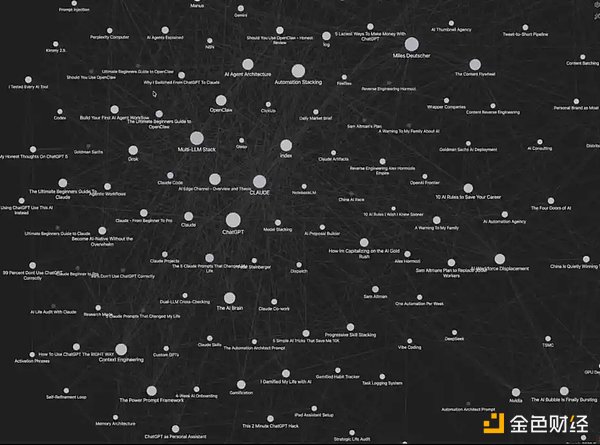
My Claude Code + Obsidian System
This system may look a bit complicated, but it only takes 5 minutes to set up. More importantly, it has a built-in memory mechanism and will continuously optimize itself as you use it.
Next, I will guide you step by step to replicate this "AI second brain" system, which can truly improve your efficiency.
I suggest you read to the end of the article—I will include a complete Claude Code + Obsidian operation cheat sheet, as well as all the resources mentioned in the article (all free).
I suggest you read to the end of the article—I will include a complete Claude Code + Obsidian operation cheat sheet, as well as all the resources mentioned in the article (all free).
Next, you need to configure a way to access Claude Code. For me (and probably for most people), the easiest way is to use the desktop client directly.
In the main chat interface, click "Select Folder," then find the Obsidian Vault you just created and select it.
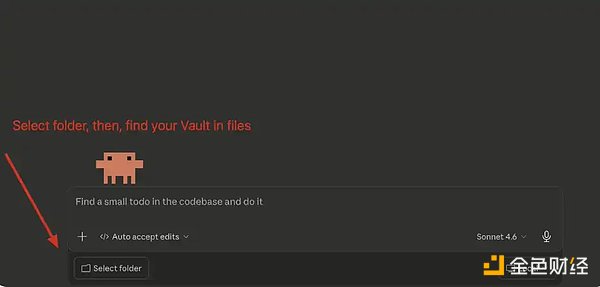
Claude Code: Connect Your Vault
After you have selected the folder, the next step is to paste Andrej Karpathy's system prompt into the main chat box.
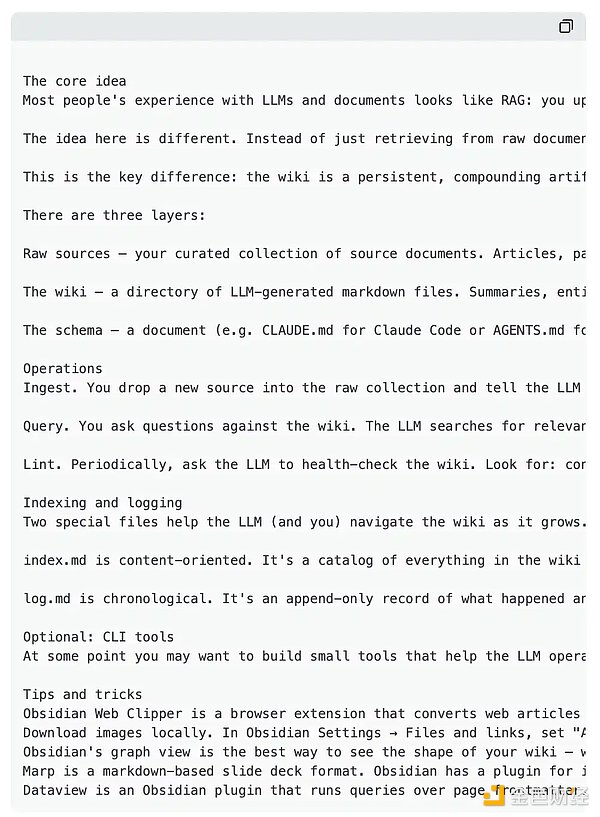
Your input should look like this:
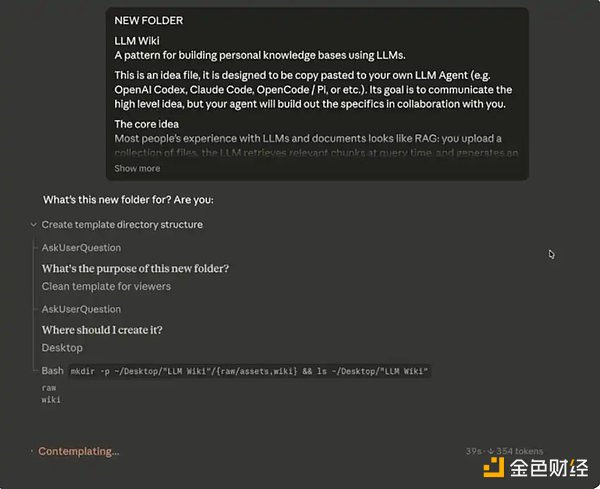
Claude Code Initial Input
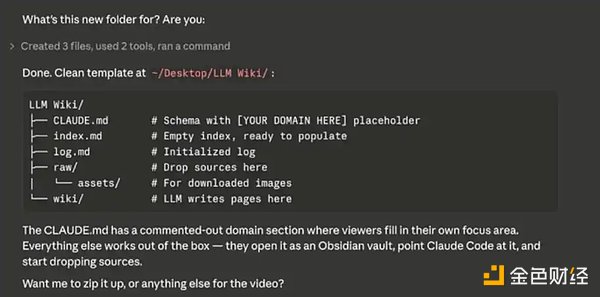
Building Your Database
You can think of Obsidian as a "blank notebook"—you need to actively input content at first, and the database will gradually be built up. Importable content includes: notes, CSV files, Markdown/text files, etc.
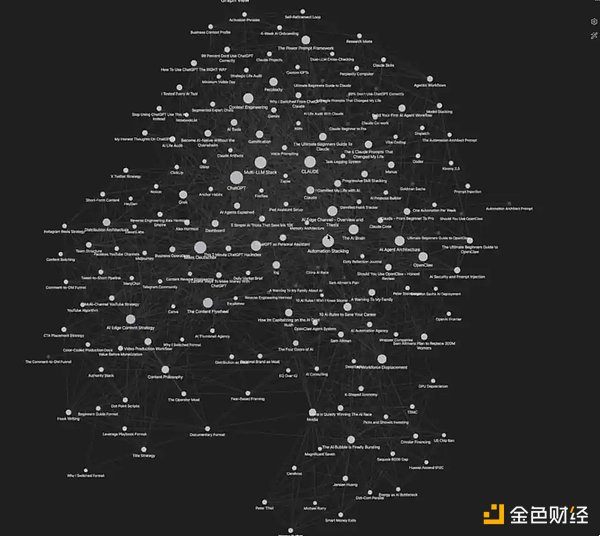
My Database
That's it! Your "AI Second Brain" is now built and ready to run. Next, I'll share some advanced tips to help you use it more efficiently.
If you want to add data to your system more easily, simply install the Obsidian Chrome extension. It allows you to directly click "Add to Obsidian" while browsing the web to save content into your knowledge base with one click.
This will make building your "second brain" incredibly easy. I myself frequently use this feature to collect articles, web page data, research materials, and more. Example: Using the Obsidian Chrome extension. Note that data added through the extension is initially just an "isolated data source." Next, you can tell Claude Code, "I just added [x] to Obsidian; please integrate this into my Wiki." Claude Code will automatically link this new data to existing content, truly integrating it into your "second brain." This is also why this toolkit is so powerful. 2. Create separate folders (Vault) Andrej Karpathy recommends using two separate folders (Vault): • One for work/business content • One for personal life/goal management My own experience also confirms that this structure is the clearest and most effective. 3. Practicality I've found that the most valuable use of this system is actually quite simple: making your LLM suggestions more accurate. When the model has access to your complete personal information, business plan, writing background, and other contextual information, it can generate more "customized" and realistic high-quality prompts (even "super prompts"). Of course, this system has many more uses than just these, but if you only want to start with one of the most practical scenarios, I strongly recommend starting with "improving prompt quality." 4. Orphans (Orphaned Nodes) In Obsidian, "Orphans" refer to data points that are not connected to other notes. This feature is very useful because it can help you: • Find ideas that haven't been integrated yet. • Discover "weak areas" in the database. • Determine which content is worth further expansion or deepening. In other words, it's not just an organization tool, but also a mechanism to help you discover blind spots in your thinking. You can click the "three dots" in the upper right corner to find and turn on the Orphans switch to see which content hasn't been linked yet. Potential Disadvantages of This System We've already discussed many advantages, use cases, and optimization methods. So what are its shortcomings? In what situations might you be unsuitable for this system? 1. People Unaccustomed to Visualization A core advantage of this system is its ability to visualize data. If you don't rely on or are not comfortable with this method, its help may be limited. 2. Requires a Certain Maintenance Cost If you are unwilling to continuously maintain a database, this system may not be suitable for you. Although the maintenance cost is not high, it's difficult to realize its value without continuously inputting data into this "second brain." 3. Storage Consumption All content is stored locally as Markdown files, which will consume some device space. This is something that needs to be considered in advance.Worldcoin's trajectory is buoyed by AI hype but faces challenges from token unlocks and utility questions.
Alex Miyuki
Elon Musk's lawsuit against OpenAI alleges breaches in contracts and fiduciary duties, stemming from his concerns about the company's profit-driven focus. While an executive suggests Musk's regrets over leaving the company as a possible motive, the dispute underscores broader ethical debates in AI development.
 Weatherly
Bitcoin's impending halving in April 2024 is anticipated to reshape supply dynamics, potentially driving prices upwards amidst heightened demand. Investors must also monitor the Federal Reserve's March rate decisions, as they could impact Bitcoin's post-halving performance alongside market sentiment.
 Anais
AnaisThe crypto industry is actively influencing the 2024 U.S. election, with Super PACs spending millions to back crypto-friendly candidates. However, ethical concerns arise amid the surge in crypto spending, highlighting the need for transparency and accountability in political interactions.
WeatherlyFTX has initiated its reimbursement strategy for creditors post-bankruptcy, but faces criticism over its claim window pricing, which significantly deviates from current market rates. Discontent among creditors persists due to the substantial gap between asset prices during the exchange's bankruptcy filing and their present market values.
 Joy
JoyBerkshire Hathaway intensifies investments in the financial sector, with a cautious yet strategic expansion, underscored by Warren Buffett's prudent outlook on global opportunities.
AlexTelegram plans to sell excess TON tokens below market value to avoid centralisation, aiming for a healthier, decentralized ecosystem amidst growing concerns and robust ecosystem growth.
MiyukiMeme coins, including WIF, PEPE, SHIB, DOGE, FLOKI, and BONK, are surging with triple-digit gains, outshining Bitcoin in the crypto market. While Bitcoin inches towards its all-time high, meme coins dominate the spotlight, showcasing unprecedented growth amidst bullish market sentiment.
Anais$BIF, a new memecoin on Solana, surged in value rapidly, drawing attention with its humorous branding and endorsements from influencers. Its fusion of popular memecoins Bonk and Dogwifhat has sparked enthusiasm among investors, but caution is advised amidst the volatile crypto market.
Joy